Torqer FFB modes explained – Native, Supplement, and Advanced Replacement
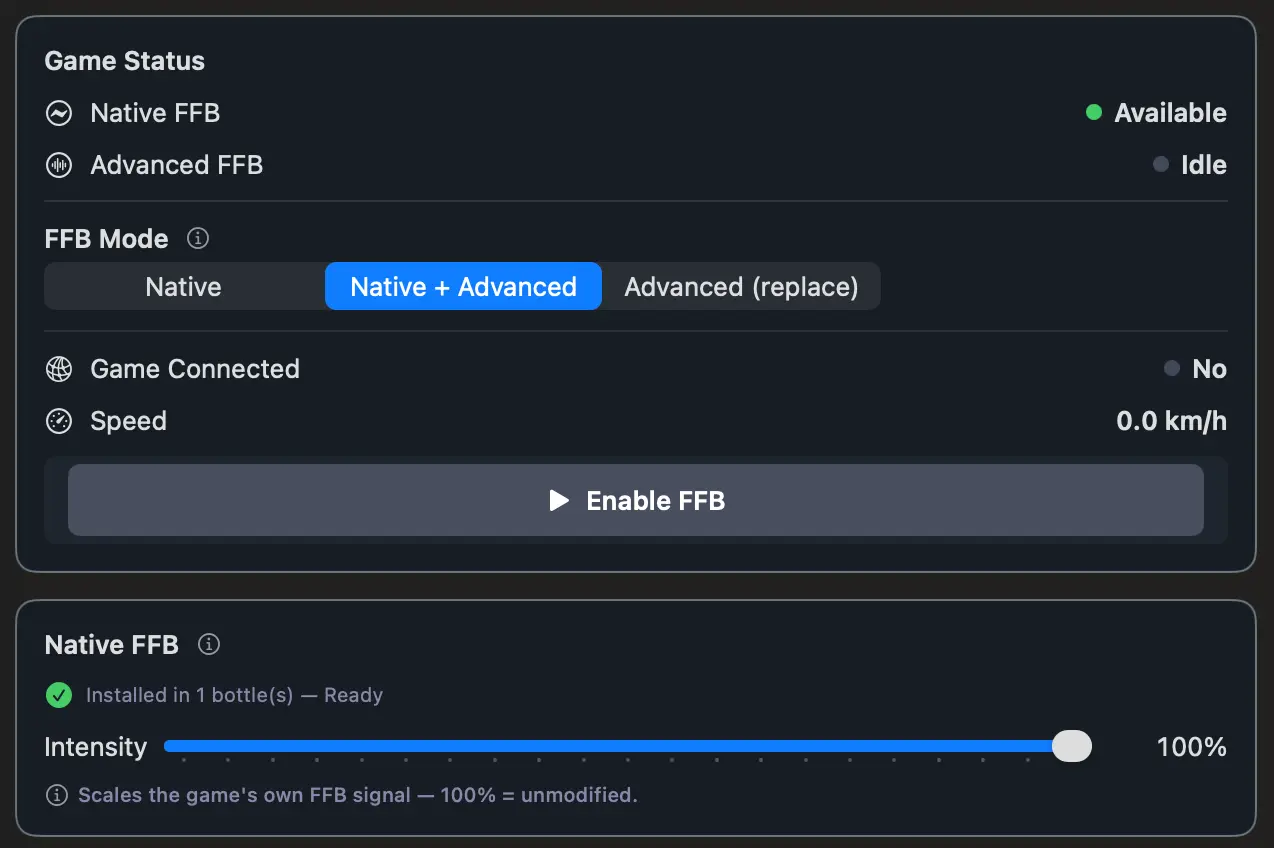
Torqer gives you three ways to run force feedback. They’re not difficulty levels – they’re different philosophies about where the FFB signal should come from and how much you want Torqer involved.
This article explains what each mode actually does, what you’ll feel behind the wheel, and which one to pick.
Why three modes?
Different drivers want different things. Some want to feel exactly what the game outputs – no more, no less. Others want the game’s base feel with a richer haptics layer on top. Others want full control over how car weight is computed, independent of what the game sends.
Native FFB
What it does: Torqer delivers the force feedback signal that the game itself generates. The game’s physics engine computes what the wheel should feel. Torqer routes that signal to your G29. That’s it.
What you feel: Exactly what the game intended. The steering weight the developers tuned. The self-centering behavior the car model produces. No additions, no processing.
Works with: All supported games – Assetto Corsa, ACC, Assetto Corsa Rally, KartKraft.
When to pick it:
- You’re getting started with Torqer and want the simplest setup
- You’re happy with how the game’s own FFB feels
- You’re running a game that doesn’t support the advanced modes (AC Rally, KartKraft)
- You want to compare against what the game is natively sending before layering anything on top
Native is the right starting point for everyone. If it feels good, stay there.
Supplement
What it does: Torqer keeps the game’s FFB signal as the foundation for steering weight, then layers its own physics-derived haptic effects on top. The game drives the core wheel feel. Torqer adds texture.
What you feel: The same base steering response you get in Native, plus:
- Road Rumble – vibration through kerbs, rough tarmac, and surface changes
- ABS Haptics – a distinct buzz in the wheel when ABS activates under braking
- Traction Control Haptics – shudder when TC cuts power mid-corner
- Gear Shift Pulse – a short tactile click on every upshift and downshift
- Collision Impact – a sharp directional force when you make contact
These effects are computed from real-time physics telemetry. They’re not generic – they respond to what’s actually happening with the car.
Available for: Assetto Corsa and ACC.
When to pick it:
- You like the way the game’s base FFB feels
- You want more information coming through the wheel – not more strength, more detail
- You’re running AC or ACC and want to get the most out of the G29
Supplement is the recommended mode for most drivers running AC or ACC. You get the game’s intended steering feel, with a proper haptics layer that tells you what the car is doing.
Advanced Replacement
What it does: Torqer takes over the car weight computation entirely. Instead of using the game’s FFB output for steering weight, Torqer derives it from its own real-time physics analysis. The haptic effects layer (Road Rumble, ABS, TC, Gear Shift, Collisions) works exactly as in Supplement.
What you feel: Torqer-computed steering weight, with the same haptics layer as Supplement. The underlying data is the same physics the game uses – Torqer just processes it differently and gives you independent control over how it translates to force.
Available for: Assetto Corsa and ACC.
When to pick it:
- The game’s native FFB signal feels too sharp, too soft, or inconsistent in a way you can’t fix with the intensity slider
- You want to tune car weight feel completely independently of what the game sends
- You’ve spent time in Native or Supplement and want more control
This is the power user mode. Most drivers don’t need it. But if you’ve been at this long enough to know that something about the game’s output isn’t quite right for you – this is where you go.
Side-by-side comparison
| Mode | Car weight source | Haptics layer | Available for |
|---|---|---|---|
| Native | Game’s own FFB signal | None | All games |
| Supplement | Game’s own FFB signal | Road Rumble, ABS, TC, Gear Shift, Collisions | AC, ACC |
| Advanced Replacement | Torqer physics analysis | Road Rumble, ABS, TC, Gear Shift, Collisions | AC, ACC |
Which one should you pick?
Start with Native. It works with every game, requires no extra configuration, and gives you a reliable baseline. If it feels good, you’re done.
Move to Supplement if you’re running AC or ACC and want more coming through the wheel. The haptics layer adds meaningful information — you’ll feel ABS, TC, and road surface changes as distinct sensations rather than being buried in the base FFB signal.
Switch to Advanced Replacement only if you have a specific reason. The clearest one: you’ve driven in Native or Supplement, something about the steering weight doesn’t feel right, and you’ve already adjusted the intensity slider and it hasn’t fixed it. Advanced Replacement gives you a fresh starting point you can tune from scratch.
All three modes are available during the 5-day trial. You can switch between them at any point – settings apply live, no restart needed.